

Description
StoreHelper Kit is an all-in-one WooCommerce toolkit that replaces a dozen single-purpose plugins. Bulk edit products and prices, generate AI ALT text and AI product descriptions, write SEO meta titles and descriptions, find duplicate products, and clean up your media library and orders — all from one modern, unified dashboard.
Whether you run a small boutique or a catalog with thousands of products, StoreHelper Kit saves you hours of manual work every week. It is built for WooCommerce store owners, SEO specialists, and developers who want fast bulk operations and AI automation without bloated, expensive plugins.
Popular things you can do with StoreHelper Kit:
- Bulk edit WooCommerce prices (flash sales, percentage or fixed changes, scheduled).
- Generate SEO-friendly image ALT text in bulk with AI (OpenAI or OpenRouter).
- Write product descriptions automatically from product photos using AI Vision.
- Generate SEO meta titles and descriptions for products (Yoast & Rank Math).
- Find and merge duplicate products by SKU or title.
- Bulk delete products and old or cancelled orders with safe filters.
- Clean up unused/orphan images to speed up your store.
- Publish llms.txt and llms-full.txt so ChatGPT, Claude, Gemini and Perplexity can discover your store.
🚀 Key Features
- Unified Dashboard: Access all tools from a single, modern, and responsive interface.
- AI-Powered Automation: Generate SEO-optimized ALT texts, meta tags, and product descriptions from images using OpenAI or OpenRouter (ChatGPT, Claude, Gemini, Llama, Mistral and 300+ models).
- AI Discovery Ready: Ship llms.txt and llms-full.txt to guide ChatGPT, Claude, and Perplexity to your key URLs.
- Bulk Operations: Update prices, delete products, find duplicates, and clean up unused media and old orders in seconds.
- Smart Filtering: Quickly find the tools you need with our categorized and searchable navigation.
- Developer Friendly: Full REST API (
storehelper-kit/v1) and WP-CLI commands (wp storehelper) for automation and external integrations. - WooCommerce Ready: Compatible with High-Performance Order Storage (HPOS) and the new Cart & Checkout Blocks.
🛠️ Available Tools
🧠 AI & SEO Tools
-
Image Alt Text Generator (AI)
- Automatically generate descriptive, SEO-friendly ALT text for your product images.
- Uses an AI Vision model to analyze the actual image content — choose OpenAI (GPT-4o) or any vision model via OpenRouter (Claude, Gemini).
- Considers your product context (Focus Keywords, Meta Descriptions) for maximum SEO impact.
- New in 3.0: Real-time progress tracking and improved error handling.
-
LLMs.txt Generator (AI, SEO)
- Publishes llms.txt and llms-full.txt for AI crawlers with curated URLs, titles, and descriptions.
- Honors Yoast, Rank Math, SEOPress, and AIOSEO noindex rules.
- Auto-regenerates on your schedule (manual, daily, weekly) with optional bot hit logging for GPTBot, ClaudeBot, and PerplexityBot.
-
AI SEO Tags Generator (AI, SEO)
- Automatically generate SEO meta titles and meta descriptions for products and posts with OpenAI.
- Native integration with Yoast SEO and Rank Math meta fields.
- Bulk processing with focus-keyword awareness for higher click-through rates.
-
AI Image to Description (AI)
- Generate full product descriptions directly from product images using AI Vision.
- Works with OpenAI (GPT-4o) or any vision model via OpenRouter (Claude, Gemini).
- Choose target field (long/short description), length, tone and language; bulk processing with one-click undo.
📦 Product Management
-
Bulk Price Updater
- Run flash sales or global price adjustments with ease.
- Filter by Category, Attribute, or Price Range.
- Increase or decrease prices by fixed amounts or percentages.
- Supports Variable Products and scheduled price changes.
-
Bulk Product Delete
- Clean up your catalog by mass-deleting products.
- Filter by Category, Stock Status (e.g., Out of Stock), or Price.
- Option: Automatically delete associated images to free up server space.
-
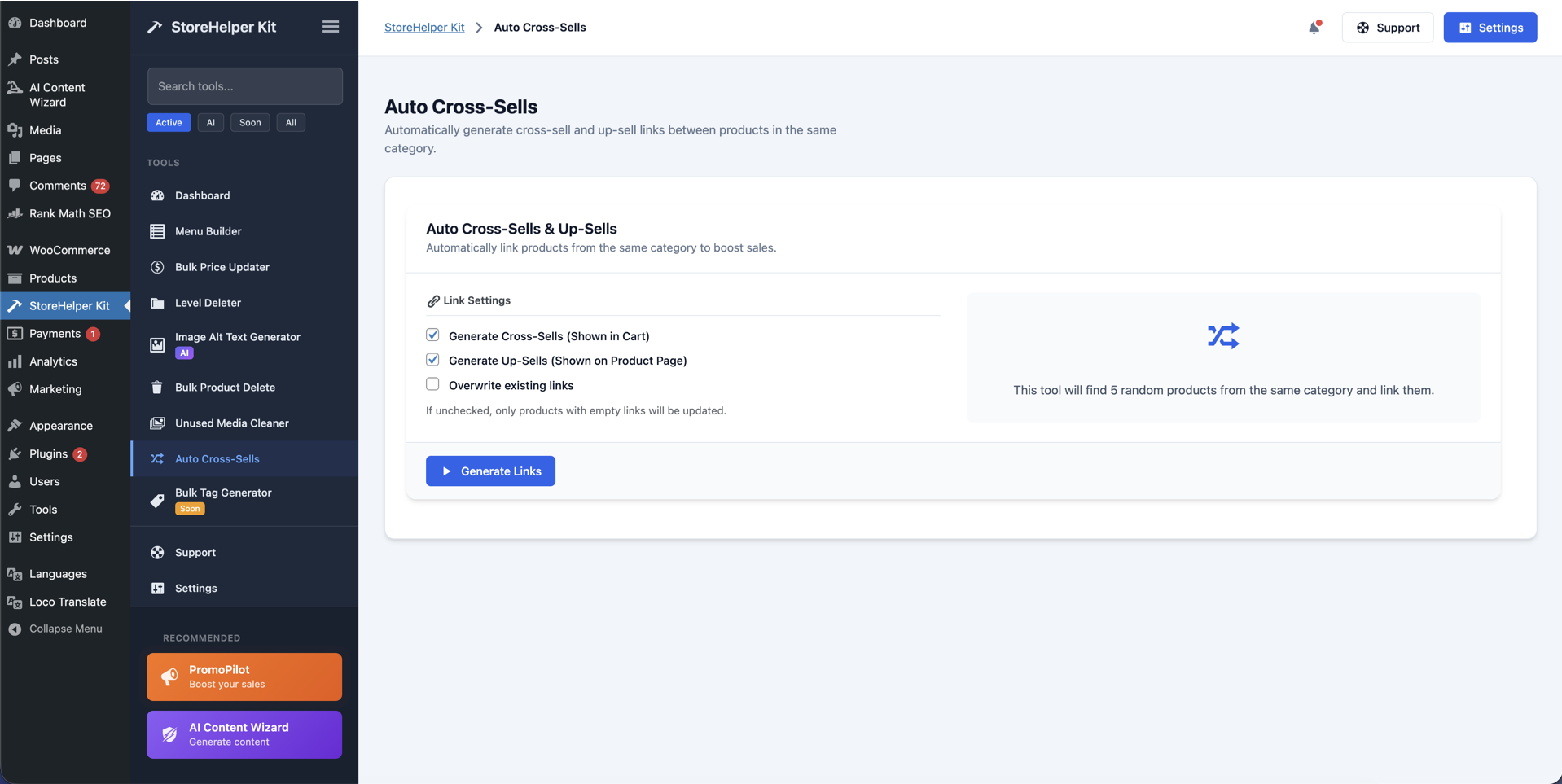
Auto Cross-Sells
- Boost your Average Order Value (AOV) automatically.
- Generates Cross-sell and Up-sell links between products in the same category.
- Randomized linking ensures diverse product exposure.
-
Duplicate Finder
- Scan your catalog for duplicate products by SKU or title.
- Preview matches side by side and merge duplicates with one click.
- Keeps your catalog clean and prevents inventory and SEO conflicts.
🎨 Design & Navigation
-
Structured Menu Builder
- Turn your WooCommerce Category tree into a WordPress Menu in one click.
- Preserves parent-child hierarchy perfectly.
- Ideal for stores with hundreds of categories where manual menu creation is impossible.
-
Filter Builder
- Create AJAX-powered attribute filters for your shop sidebar.
- Select top attributes (Color, Size, Brand) and customize their labels.
- Improves customer navigation and conversion rates.
-
Brand Image Finder
- Automatically fetch brand logos using SeekLogo and Clearbit APIs.
- Assigns logos to your product attribute terms (e.g., “Nike”, “Adidas”).
- Keeps your brand filters looking professional.
🧹 Cleanup & Maintenance
-
Unused Media Cleaner
- Scan your Media Library for “orphan” images not attached to any post or product.
- Safely delete unused files to reduce backup size and improve site speed.
-
Category Level Deleter
- Prune your category tree by deleting specific levels (e.g., “Delete all 3rd-level subcategories”).
- Perfect for restructuring imported catalogs.
-
Order Cleaner
- Bulk delete old, cancelled, or trashed orders with status and date filters.
- Batch processing with a dry-run preview before anything is removed.
- HPOS-compatible — keeps your orders table lean and your store fast.
🔜 Coming Soon (Roadmap)
We are constantly adding new tools. Here is what’s coming next:
- Abandoned Cart Lite: Recover lost sales with email reminders.
- Watermark Applier: Protect your product images in bulk.
- Shop Manager: Advanced product management dashboard.
👤 Who is it for?
StoreHelper Kit is a great fit if you are looking for a WooCommerce bulk edit plugin, an AI alt text generator, an AI product description generator, a duplicate product finder, a bulk price changer, an unused media cleaner, or a bulk product / order delete tool — without installing a separate plugin for each task. It works for store owners, agencies, dropshippers with large imported catalogs, and developers automating WooCommerce via REST API or WP-CLI.
External Services
This plugin integrates with the following third-party services. All requests occur only when you initiate logo retrieval or image updates:
-
SeekLogo API
- Purpose: Automated logo search and retrieval.
- Data sent: Brand name or taxonomy term.
- When: On-demand, when fetching or auto-updating brand images.
- Terms of Service: https://seeklogo.com/terms-of-service
- Privacy Policy: https://seeklogo.com/privacy-policy
-
Clearbit Logo API (optional)
- Purpose: Fallback logo lookup using Clearbit’s Logo service.
- Data sent: Brand domain or name.
- When: Only if SeekLogo returns no results and the option is enabled in settings.
- Terms of Service: https://clearbit.com/legal/terms
- Privacy Policy: https://clearbit.com/legal/privacy
-
WordPress.org Plugin API
- Purpose: Retrieve plugin icons and metadata if linked to a WordPress.org project.
- Data sent: Plugin slug.
- When: When displaying plugin-related images in the admin interface.
- Terms & Privacy: https://developer.wordpress.org/plugins/wordpress-org/plugin-assets-api/
-
OpenAI API
- Purpose: AI‑powered generation of image ALT text and SEO meta tags (vision + text).
- Data sent: Image URL and a short textual prompt with page/post context (e.g., focus keyword, meta description). Your API key is used to authorize the request.
- When: Only when you explicitly trigger AI generation and OpenAI is selected as the provider.
- Terms of Use: https://openai.com/policies/terms-of-use
- Privacy Policy: https://openai.com/policies/privacy-policy
-
OpenRouter API (optional)
- Purpose: Alternative AI provider giving access to models from OpenAI, Anthropic (Claude), Google (Gemini), Meta (Llama), Mistral and others through a single key.
- Data sent: The same prompt/image context as above, plus your site name and URL as attribution headers. Your OpenRouter API key authorizes the request.
- When: Only when you explicitly trigger AI generation and OpenRouter is selected as the provider in Settings.
- Terms of Service: https://openrouter.ai/terms
- Privacy Policy: https://openrouter.ai/privacy
Screenshots


Installation
- Upload the
storehelper-kitfolder to the/wp-content/plugins/directory. - Activate the plugin through the ‘Plugins’ menu in WordPress.
- Go to WooCommerce > StoreHelper Kit to access the dashboard.
- (Optional) Enter your OpenAI API Key in the Settings tab to enable AI features.
FAQ
-
Is the AI feature free?
-
The plugin integration is free, but you need your own API key from OpenAI or OpenRouter. You pay the provider directly for usage, which is typically very cheap (pennies for hundreds of images).
-
Which AI providers and models are supported?
-
You can choose between OpenAI and OpenRouter in Settings. OpenRouter gives you a single key to access models from OpenAI (GPT-4o), Anthropic (Claude), Google (Gemini), Meta (Llama), Mistral and 300+ others. The Settings screen includes a convenient model picker with a “Load models” button that fetches the live model list, plus a field to enter any custom model ID.
-
Can I undo bulk changes?
-
Most bulk operations (like Price Updates) are direct database changes. We strongly recommend taking a full database backup before running any bulk tool.
-
Does it work with huge catalogs?
-
Yes! Our tools use AJAX and batch processing to handle thousands of items without timing out your server.
-
Is it compatible with WooCommerce HPOS (High-Performance Order Storage)?
-
Yes. StoreHelper Kit declares full compatibility with HPOS / custom order tables and with the new Cart & Checkout Blocks, so you won’t see any incompatibility warnings.
-
How do I bulk edit WooCommerce prices?
-
Open StoreHelper Kit > Bulk Price Updater, filter products by category, attribute, or price range, then increase or decrease prices by a fixed amount or percentage. Variable products and scheduled changes are supported.
-
Is the AI ALT text feature GDPR-safe?
-
The plugin only sends an image URL and short page context to your chosen AI provider (OpenAI or OpenRouter), and only when you explicitly trigger generation. No customer data is sent. See the External Services section for full details.
-
Does it support variable products?
-
Yes. Bulk pricing, ALT text generation, and duplicate detection all support variable products and their variations.
-
Can I automate tasks with REST API or WP-CLI?
-
Yes. Every major tool is exposed through the
storehelper-kit/v1REST API namespace and throughwp storehelperWP-CLI commands (info, tools, stats, alt, duplicates, clean-orders, history, settings, cache). -
Do I need WooCommerce for every tool?
-
Most tools require WooCommerce, but utilities like the Unused Media Cleaner, Image ALT Text Generator, and LLMs.txt Generator are useful on any WordPress site.
Reviews
There are no reviews for this plugin.
Contributors & Developers
“StoreHelper Kit – WooCommerce Bulk Edit, AI ALT Text & SEO Toolkit” is open source software. The following people have contributed to this plugin.
Contributors
Translate “StoreHelper Kit – WooCommerce Bulk Edit, AI ALT Text & SEO Toolkit” into your language.
Interested in development?
Browse the code, check out the SVN repository, or subscribe to the development log by RSS.
Changelog
3.5.0
(30.06.2026)
Added
* OpenRouter AI provider — use a single API key to access ChatGPT, Claude, Gemini, Llama, Mistral and 300+ models across every AI tool.
* AI Image to Description — generate WooCommerce product descriptions directly from product images using AI Vision.
* Model picker in Settings with a live “Load models” button and a custom model ID field.
* AI Usage panel in Settings showing token usage per provider (with one-click reset).
Improved
* Utility tools (Image ALT Text, Unused Media Cleaner, LLMs.txt) now run on any WordPress site — WooCommerce is no longer required for them.
* ALT Text Generator now defaults to images that are missing ALT, and respects your configured model instead of a hard-coded one.
* All AI requests now go through one provider layer (endpoint, headers, model) for consistent behavior across tools.
* Expanded, search-optimized plugin description and FAQ; documentation now lists every active tool.
Compatibility
* Declared WooCommerce HPOS (custom order tables) and Cart & Checkout Blocks compatibility.
* Tested with WordPress 7.0 and WooCommerce 10.9.
3.4.0
(05.03.2026)
* NEW: AI SEO Tags Generator – automatically generate meta titles and descriptions using OpenAI with Yoast SEO and Rank Math support.
* NEW: Duplicate Finder – scan for duplicate products by SKU or title, preview and merge duplicates with one click.
* NEW: Order Cleaner – bulk delete old or cancelled orders with status/date filters, batch processing, and dry run preview.
* NEW: REST API – full REST API under storehelper-kit/v1 namespace for automation and external integrations.
* NEW: WP-CLI support – run tools from command line with wp storehelper commands (info, tools, stats, alt, duplicates, clean-orders, history, settings, cache).
* NEW: Dashboard Widget – quick stats widget in WordPress admin dashboard showing product counts, orders, and media stats.
* NEW: Helper functions library – caching, rate limiting, operation history/undo, export/import settings, notifications (Telegram/Slack/Email).
* Improved: Performance caching for tool metadata with transients.
* Improved: Rate limiting for OpenAI API calls to prevent quota issues.
* Fixed: Typo in PromoPilot links (propmopilot.link promopilot.link).
3.3.0
(29.01.2026)
* CRITICAL FIX: ALT text generator now processes images reliably – fixed issue where background processing would not start or stop unexpectedly.
* Fix: Added spawn_cron() call to force immediate cron execution when starting ALT generation.
* Fix: Improved queue processing with proper locking mechanism to prevent concurrent execution issues.
* Fix: Auto-trigger processing now fires every 4 seconds reliably while user has the tool open (replaced unreliable random trigger).
* Fix: Reduced batch size from 5 to 3 images per batch to prevent timeouts on slower servers.
* NEW: Real-time progress display showing recently processed images with their generated ALT texts.
* NEW: Smart language detection – uses global language setting from Settings, or auto-detects language from page content (Russian, Ukrainian, Spanish, etc.).
* NEW: Enhanced progress popup with live results feed, language indicator, and visual feedback.
* Improved: Better error handling and logging during ALT text generation with last 5 errors stored in status.
* Improved: First batch now processes immediately after starting for instant feedback.
* Improved: Queue now properly clears scheduled hooks before rescheduling to avoid duplicates.
* Improved: Completion state now shows “Completed!” message before page reload.
3.2.1
(18.12.2025)
* Fix: llms.txt activation toggle now stays saved because the enable switch is submitted with the rest of the form.
3.2
(13.12.2025)
* New: LLMs.txt Generator tool to publish llms.txt and llms-full.txt for AI crawlers with SEO plugin aware exclusions.
* Added: Optional AI bot hit logging and scheduled regeneration (manual/daily/weekly).
* Added: SEO badge/tag for the llms.txt tool; version bump to 3.2.
* Added: SEO filters/badges in dashboard + sidebar, improved llms.txt rewrite handling to avoid 404s, auto-cache warmup, and wildcard exclusions for llms.txt.
* Added: On/off toggle to disable llms.txt serving and pause cron regeneration when needed.
3.0
(25.11.2025)
* Major Update: Redesigned Admin UI with a modern, card-based dashboard.
* New: Added “Support” and “Settings” quick access buttons.
* New: Smart API Key detection – see instantly which AI tools are ready to use.
* New: Dashboard Filters – toggle between All, AI, and Setup Required tools.
* Improved: Enhanced attribute-stats.php stability and JSON response handling.
* Improved: Better error handling for AI generation tasks.
* Added: Detailed documentation and tool descriptions.
2.6
(07.08.2025)
* Improved: ALT Text Generator now runs sequential per-image requests via AJAX to avoid timeouts/HTTP2 protocol issues and provide a smoother experience.
* Added: Real-time progress modal with success/error counters and a live log of operations.
* Added: Robust error logging to wp-content/uploads/storehelper-logs/alt_text_generator.log with fallback to wp-content/alt_text_generator.log.
* Improved: Clean JSON responses and stricter nonce validation to prevent mixed admin HTML in responses and to surface clear error messages.
* Improved: Keyword handling — when no focus keyword is available, ALT is generated from image and page context without failing.
* UI: Refined filters layout, compact modal, textarea for ALT, sticky actions bar, and a per-page selector with working pagination.
* Fix: Eliminated sporadic 400 Bad Request cases by routing same-page POSTs and cleaning output buffers before returning JSON.
2.5
(03.08.2025)
* New: AI Alt Text Generator for images — analyzes page content and the image itself to produce natural, keyword‑aware ALT attributes.
* New: Structured Menu Builder — instantly builds a full navigation tree from all WooCommerce categories, preserving hierarchy; scales to 100s and 1,000s of categories.
* Integration: OpenAI for ALT generation (requires your API key).
2.3
- Enforced mandatory nonce validation for dashboard tool selection to prevent CSRF.
- Added ‘nonceDashboard’ field to the localized script in storehelper_kit_admin_assets() for secure AJAX requests.
- Removed legacy nonce check block and ensured early termination on missing or invalid nonce in storehelper_kit_admin_dashboard().
2.2
- Added deep sanitization of the
attributesarray in the attribute statistics tool usingsanitize_text_field( wp_unslash( ... ) ). - Corrected use of the
variable for limiting displayed attributes instead of insecure direct reading from. - Added a nonce check (
storehelper_kit_dashboard_nonce) instorehelper_kit_admin_dashboard()to prevent CSRF.
2.1
- Replaced external placeholder URL with local
logo-placeholder.jpg. - Documented SeekLogo and Clearbit services with separate Terms of Service and Privacy Policy links.
- Added ABSPATH guard to prevent direct file access in plugin PHP files.
- Implemented nonce and
current_user_can()checks for all AJAX handlers and form submissions. - Sanitized, validated, and escaped all incoming and outgoing data.
- Replaced unsafe SQL calls with
get_posts()(WP_Query) for secure database interactions. - Renamed generic option names to unique prefixes (e.g.,
storehelperkit_widget_...).
2.0
- Major overhaul: refactored all tools for better performance and security.
- Added support for PHP 8.1+ and modern WordPress APIs.
- Improved i18n compliance and sanitized all inputs/outputs.
- Updated readme, documentation, and screenshots.
1.9
- Fixed price update batching bug.
- Added nonce verification to all AJAX actions.
- Enhanced filters in attribute statistics tool.
1.8
- Initial public release.