

Description
LlamaHire brings job publishing, a careers page, and application management into WordPress. Use it for one company’s hiring or for a multi-employer job board.
Publish and discover jobs
- Create jobs with departments, physical or remote locations, employment details, salary ranges, deadlines, and organization information.
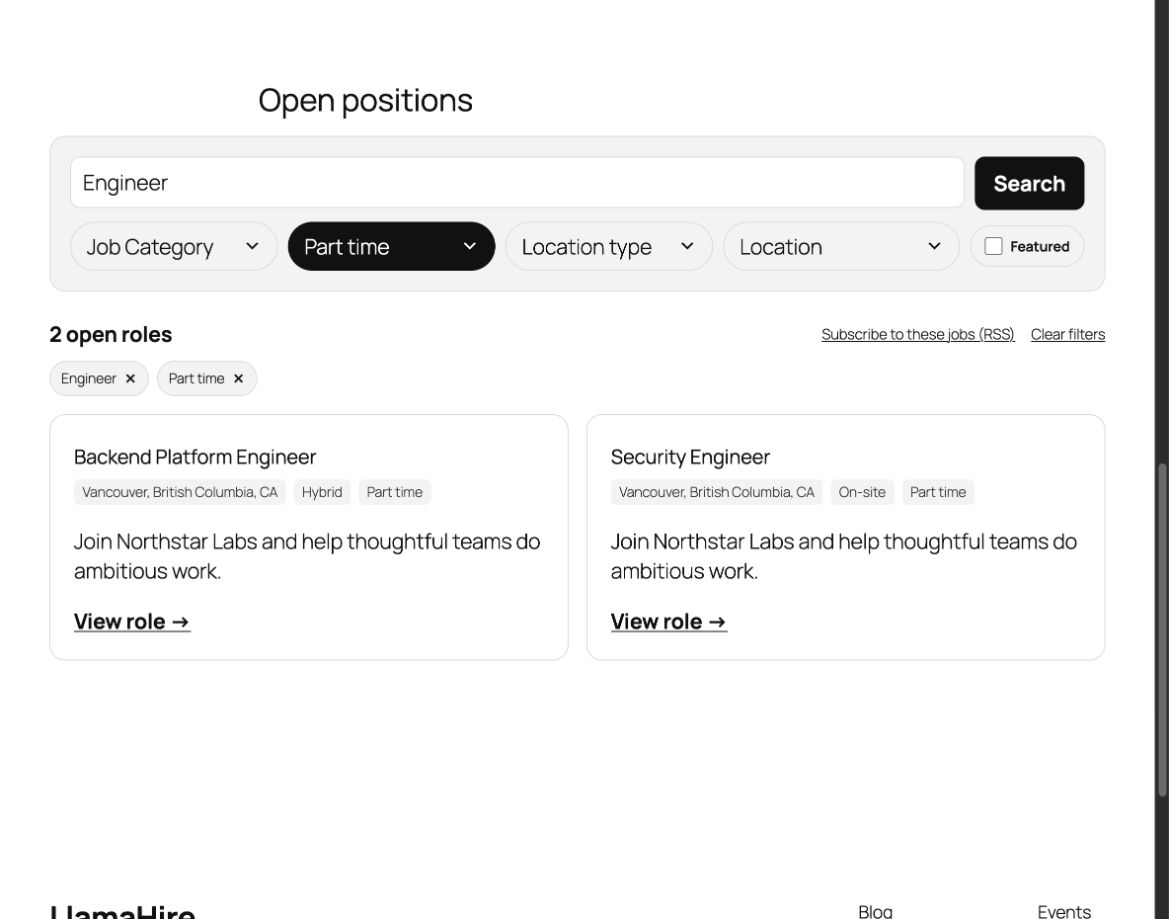
- Build a careers page with WordPress blocks and patterns. Combine the job search, filters, directory, job cards, and featured jobs to fit your theme.
- Let visitors filter and share job results through URLs. Open jobs can appear in the job RSS feed and WordPress XML sitemaps.
- Show job facts and JobPosting structured data from the same saved fields. Closed and expired jobs remain available as historical pages without accepting new applications.
Collect and review applications
- Add an application form to published jobs or place the Application Form block on a page.
- Choose whether phone, resume, and cover letter fields are required, optional, or hidden. Optional Turnstile or reCAPTCHA challenges can be enabled by an administrator.
- Review applications in a searchable, filterable inbox; update statuses, add private notes, and export CSV files. Granular permissions limit who can view candidate data.
- Configure candidate and hiring-team emails, delivery previews, retention, and the privacy notice shown beside application forms. Resumes are stored privately and downloaded through an authorized endpoint.
Run a multi-employer job board
Job-board mode adds email-verified employer registration, optional operator approval, frontend job submission and editing, “My Jobs” and “Employer Account” pages, and an employer workspace for applications to their own jobs. Operators can configure active-listing limits and listing duration. Company careers mode keeps the simpler workflow for one organization.
Source code and support
Source code and build instructions. The bundled admin JavaScript and CSS are built from the unminified src/ files with npm ci and npm run build.
For setup help, use the WordPress.org support forum. To report a bug, open an issue on GitHub.
External services
All external integrations are optional and disabled by default.
Optional usage reporting
With administrator consent in Setup or Settings, LlamaHire sends PostHog a random installation ID, site URL, site mode, LlamaHire, WordPress, and PHP versions, aggregate job counts, active plugin and theme names and versions, locale, and multisite status. Events occur when reporting starts, on reactivation, and in snapshots scheduled every 15 days. No applicant, employer-account, visitor activity, individual job, or page-view data is included. Disable reporting in Settings to stop future events.
Service | Privacy | Reporting details
Google Geocoding API
Adding a Google Geocoding API key enables lookups of saved physical and hybrid job addresses, including draft and pending jobs. Street, locality, region, postal code, and country are sent with the API key to obtain coordinates for JobPosting structured data; fully remote jobs are excluded. Remove the key to stop future lookups.
Cloudflare Turnstile
When configured and enabled for applications or employer registration, forms load Cloudflare’s widget with the form context and send the verification token and secret key for validation; Cloudflare may also receive visitor IP addresses and browser information.
Google reCAPTCHA
When configured and enabled for applications or employer registration, forms load Google’s widget and send the verification token and secret key for validation; Google may also receive visitor IP addresses and browser information.
Screenshots


Blocks
This plugin provides 7 blocks.
- Single Job Details Display structured facts for the current job.
- Jobs Directory Display searchable, filterable open roles.
- Job Filters Filter open roles by department, employment type, location type, location, or featured status.
- Featured Jobs Display a collection of open featured jobs.
- Application Form Collect candidate applications for a job.
- Job Card Display the current job supplied by a LlamaHire job collection.
- Job Search Search open roles by title or keyword.
Installation
- Install and activate LlamaHire from Plugins in WordPress.
- Open Jobs > Setup and choose a company careers site or multi-employer job board. Set your organization details, hiring inbox, candidate privacy notice, retention period, and Careers page.
- Add a job under Jobs, complete its details, and publish it. Jobs accepting on-site applications show the application form automatically.
- Review incoming applications under Jobs > Applications. In job-board mode, review the employer registration and public submission settings before inviting employers.
FAQ
-
Where are applications stored?
-
Applications use a dedicated database table. Resume files are stored in a private directory and can only be downloaded by an authorized WordPress user through a protected endpoint. The configured retention period controls scheduled deletion of older applications and resumes. LlamaHire also connects to WordPress’s personal-data export and erasure tools.
By default, production resume uploads require writable storage outside the public web root. A host can explicitly configure a verified protected fallback; otherwise uploads fail closed. Site Health reports the storage status so the host can correct it before accepting applications.
-
Can employers submit their own jobs?
-
Yes. Choose multi-employer job-board mode in Setup. Employers verify their email address, then receive access automatically or after operator approval, according to the board’s settings. They can create and manage their own listings and review applications to their own jobs. Site operators retain board-wide control.
-
Does the plugin require WooCommerce or an external account?
-
No. LlamaHire has no WooCommerce dependency, and its core job and application features do not require an external account. Optional geocoding and anti-spam providers require keys from their respective services.
-
Will application emails reach my inbox?
-
LlamaHire sends through WordPress’s configured mail transport. Configure the hiring inbox in Setup or Settings and send a test email. Delivery depends on your site’s mail configuration; Site Health reports related setup guidance.
-
How does LlamaHire compare with WP Job Manager?
-
Both plugins support job publishing, searchable listings, and frontend employer job management. WP Job Manager provides a shortcode-based core with an extension ecosystem, including Applications, Resume Manager, Job Alerts, and WooCommerce Paid Listings.
LlamaHire includes on-site applications, private resume uploads, an applications inbox, hiring stages, private notes, and privacy controls in the free plugin. Its careers pages use WordPress blocks and patterns, with separate modes for company hiring and multi-employer boards.
LlamaHire is not a drop-in replacement for WP Job Manager themes, shortcodes, or extensions. If your board depends on paid listings, a searchable resume database, or job alerts, plan those requirements before switching.
-
Can I migrate from WP Job Manager?
-
Yes. LlamaHire includes a same-site WP-CLI importer for WP Job Manager core listings. Back up your site and test the migration on staging first.
- Install LlamaHire on the site containing your WPJM data and complete Setup.
- Preview a batch with
wp llamahire import wpjm --user=YOUR_BOARD_MANAGER. - Copy that batch with the same command plus
--commit. Jobs are created as drafts; WPJM records are left untouched. - Continue with the reported
--aftercursor until no records remain. Preview and commit each batch using the same starting cursor. - Review imported fields, application routing, listing dates, and employer access before publishing. Replace WPJM page shortcodes with LlamaHire blocks and pages, and arrange redirects before switching public URLs.
The importer copies supported job content, company details, ownership, locations, job types, categories, salaries, and application email/URL targets. It does not migrate applications, resumes, notes, paid packages, subscriptions, alerts, bookmarks, custom fields, employer permissions, settings, or redirects. Existing copies are skipped on repeat runs.
See the migration guide for field mappings, review codes, and batch recovery.
Reviews
There are no reviews for this plugin.
Contributors & Developers
“LlamaHire – Job Board & Careers” is open source software. The following people have contributed to this plugin.
Contributors
Translate “LlamaHire – Job Board & Careers” into your language.
Interested in development?
Browse the code, check out the SVN repository, or subscribe to the development log by RSS.
Changelog
0.1.0
- Initial release with company and multi-employer job-board modes, careers blocks and patterns, structured job details, applications, private resumes, employer self-service, recruiter workflows, privacy controls, and JobPosting structured data.